git push 또는 commit 실행 전에 특정 파일(버전 정보가 등록되어있는 파일)의 문자열을 자동으로 치환하여 반영 할 수 있도록 shell 스크립트를 작성해 보았다.
이 스크립트로 특정 명령어를 commit 메세지에 포함 할 경우 버전 넘버를 수정 하도록 하면 되겠다. 매개변수를 받아서 처리 할 수 있다면 더 좋을 것 같다.
최종 스크립트
#!/bin/sh
#echo "commit githooks"

path="./src/version/current.js"
# ver-major / ver-minor / ver-patch / ver-hotfix
tokens=('MAJOR' 'MINOR' 'PATCH' 'REVISION')

#cat .git/COMMITMESSAGE
#versionTok=`grep -oP '(?<=#)(\s)(.*$)' ".git/COMMITMESSAGE"`
versionTok=`grep -oP '[?<=#]\w+' .git/COMMITMESSAGE`
# echo "$versionTok"
# check=`grep 'major' ".git/COMMITMESSAGE"`
# if [ -z "$check" ]
# then
# echo "empty"
# else
# echo "not empty"
# fi

echo "$versionTok"
substr='#major'
token="${tokens[0]}"
if [[ "$versionTok" =~ "$substr" ]]
then
# match
major=`grep -oP "(?<=$token=)\w+" $path`
_major=$(($major+1))
echo "$token : $major >> $_major"
grep -rl "$token" $path|xargs sed -i "s/$major/$_major/g"
fi

substr='#minor'
token="${tokens[1]}"
if [[ "$versionTok" =~ "$substr" ]]
then
# match
major=`grep -oP "(?<=$token=)\w+" $path`
_major=$(($major+1))
echo "$token : $major >> $_major"
grep -rl "$token" $path|xargs sed -i "s/$major/$_major/g"
fi
substr='#patch'

token="${tokens[2]}"
if [[ "$versionTok" =~ "$substr" ]]
then
major=`grep -oP "(?<=$token=)\w+" $path`
_major=$(($major+1))
echo "$token : $major >> $_major"
grep -rl "$token" $path|xargs sed -i "s/$major/$_major/g"
fi

#value=`cat $path`
#echo "$value"
#file=$(<./src/version/current.js)
#echo "$file"
# add changes to commit state
git add ./src/version/current.js

exit 0
---[pre-commit]---
#!/bin/sh
#echo "hello githooks"
path="./src/version/current.js"
tokens=('MAJOR' 'MINOR' 'PATCH' 'REVISION')
major=`grep -oP "(?<=${tokens[0]}=)\w+" $path`
minor=`grep -oP "(?<=${tokens[1]}=)\w+" $path`
patch=`grep -oP "(?<=${tokens[2]}=)\w+" $path`
_major=$(($major+10))
_minor=$(($minor+5))
_patch=$(($patch+100))
echo "${tokens[0]} : $major >> $_major"
echo "${tokens[1]} : $minor >> $_minor"
echo "${tokens[2]} : $patch >> $_patch"
grep -rl "${tokens[0]}" $path|xargs sed -i "s/$major/$_major/g"
grep -rl "${tokens[1]}" $path|xargs sed -i "s/$minor/$_minor/g"
grep -rl "${tokens[2]}" $path|xargs sed -i "s/$patch/$_patch/g"
#value=`cat $path`
#echo "$value"
#file=$(<./src/version/current.js)
#echo "$file"
exit 1
--- [./src/version/current.js] ---
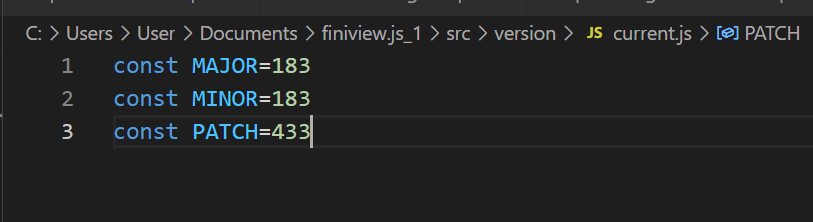
const MAJOR=173
const MINOR=173
const PATCH=333
실행전
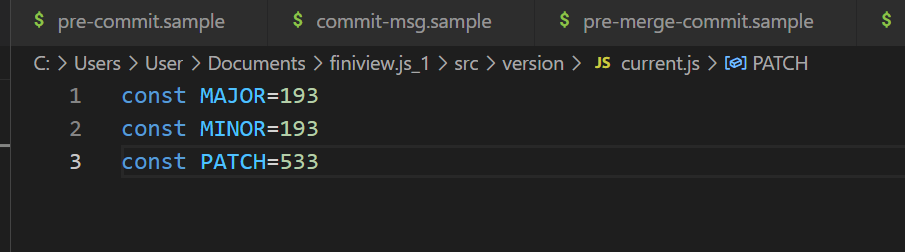
실행 후
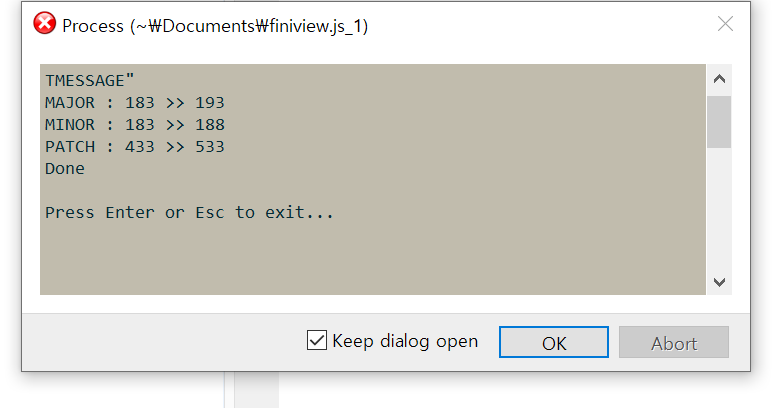
로그 메세지
#!/bin/sh
#echo "commit githooks"
#특정 문자열 입력시만 작동하는 분기 로직

path="./src/version/current.js"
tokens=('MAJOR' 'MINOR' 'PATCH' 'REVISION')

# ver-major / ver-minor / ver-patch / ver-hotfix


#cat .git/COMMITMESSAGE
#versionTok=`grep -oP '(?<=#)(\s)(.*$)' ".git/COMMITMESSAGE"`
versionTok=`grep -oP '[?<=#]\w+' .git/COMMITMESSAGE`
# echo "$versionTok"
# check=`grep 'major' ".git/COMMITMESSAGE"`
# if [ -z "$check" ]
# then
# echo "empty"
# else
# echo "not empty"
# fi

echo "$versionTok"
substr='#major'
if [[ "$versionTok" =~ "$substr" ]]
then
#echo "match"
else
#echo "not match"
fi

substr='#minor'
if [[ "$versionTok" =~ "$substr" ]]
then
#echo "match"
else
#echo "not match"
fi

substr='#patch'
if [[ "$versionTok" =~ "$substr" ]]
then
#echo "match"
else
#echo "not match"
fi


#value=`cat $path`
#echo "$value"
#file=$(<./src/version/current.js)
#echo "$file"
# add changes to commit state
git add ./src/version/current.js

exit 1
리눅스 bash 스크립트 기능 찾을 때 참고한 사이트들
연산자 사용법
https://www.geeksforgeeks.org/bash-script-arithmetic-operators/
배열 사용법
https://shlee1990.tistory.com/918
문자열 치환 (sed)
https://askubuntu.com/questions/76808/how-do-i-use-variables-in-a-sed-command
특정 파일의 특정 문자열 치환 (grep | sed)
https://unix.stackexchange.com/questions/472476/grep-global-find-replace
https://www.hahwul.com/2019/02/10/multi-file-replace-string-with-grep-sed/
쉘 기본 사용 법
https://engineer-mole.tistory.com/200
깃 훅 예제
https://engineer-mole.tistory.com/200