스마트폰 사이드 볼륨 버튼 위/아래를 순서대로 누른후
전원 버튼을 스마트폰이 꺼질때까지 계속 누르고 있으면 재시동 된다.
스마트폰 사이드 볼륨 버튼 위/아래를 순서대로 누른후
전원 버튼을 스마트폰이 꺼질때까지 계속 누르고 있으면 재시동 된다.
git push 또는 commit 실행 전에 특정 파일(버전 정보가 등록되어있는 파일)의 문자열을 자동으로 치환하여 반영 할 수 있도록 shell 스크립트를 작성해 보았다.
이 스크립트로 특정 명령어를 commit 메세지에 포함 할 경우 버전 넘버를 수정 하도록 하면 되겠다. 매개변수를 받아서 처리 할 수 있다면 더 좋을 것 같다.
#!/bin/sh
#echo "commit githooks"

path="./src/version/current.js"
# ver-major / ver-minor / ver-patch / ver-hotfix
tokens=('MAJOR' 'MINOR' 'PATCH' 'REVISION')

#cat .git/COMMITMESSAGE
#versionTok=`grep -oP '(?<=#)(\s)(.*$)' ".git/COMMITMESSAGE"`
versionTok=`grep -oP '[?<=#]\w+' .git/COMMITMESSAGE`
# echo "$versionTok"
# check=`grep 'major' ".git/COMMITMESSAGE"`
# if [ -z "$check" ]
# then
# echo "empty"
# else
# echo "not empty"
# fi

echo "$versionTok"
substr='#major'
token="${tokens[0]}"
if [[ "$versionTok" =~ "$substr" ]]
then
# match
major=`grep -oP "(?<=$token=)\w+" $path`
_major=$(($major+1))
echo "$token : $major >> $_major"
grep -rl "$token" $path|xargs sed -i "s/$major/$_major/g"
fi

substr='#minor'
token="${tokens[1]}"
if [[ "$versionTok" =~ "$substr" ]]
then
# match
major=`grep -oP "(?<=$token=)\w+" $path`
_major=$(($major+1))
echo "$token : $major >> $_major"
grep -rl "$token" $path|xargs sed -i "s/$major/$_major/g"
fi
substr='#patch'

token="${tokens[2]}"
if [[ "$versionTok" =~ "$substr" ]]
then
major=`grep -oP "(?<=$token=)\w+" $path`
_major=$(($major+1))
echo "$token : $major >> $_major"
grep -rl "$token" $path|xargs sed -i "s/$major/$_major/g"
fi

#value=`cat $path`
#echo "$value"
#file=$(<./src/version/current.js)
#echo "$file"
# add changes to commit state
git add ./src/version/current.js

exit 0
---[pre-commit]---
#!/bin/sh
#echo "hello githooks"
path="./src/version/current.js"
tokens=('MAJOR' 'MINOR' 'PATCH' 'REVISION')
major=`grep -oP "(?<=${tokens[0]}=)\w+" $path`
minor=`grep -oP "(?<=${tokens[1]}=)\w+" $path`
patch=`grep -oP "(?<=${tokens[2]}=)\w+" $path`
_major=$(($major+10))
_minor=$(($minor+5))
_patch=$(($patch+100))
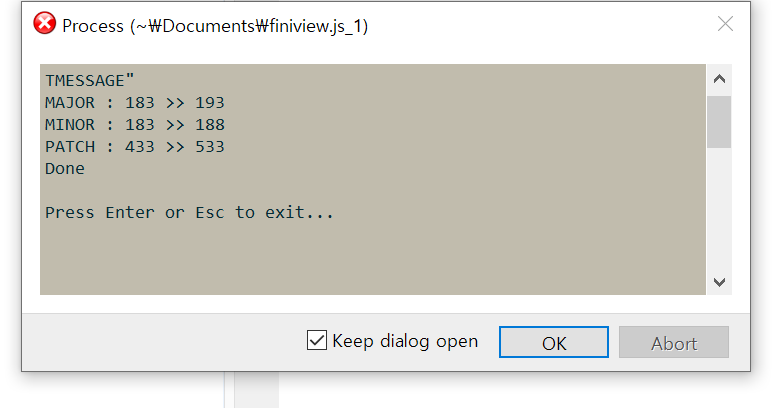
echo "${tokens[0]} : $major >> $_major"
echo "${tokens[1]} : $minor >> $_minor"
echo "${tokens[2]} : $patch >> $_patch"
grep -rl "${tokens[0]}" $path|xargs sed -i "s/$major/$_major/g"
grep -rl "${tokens[1]}" $path|xargs sed -i "s/$minor/$_minor/g"
grep -rl "${tokens[2]}" $path|xargs sed -i "s/$patch/$_patch/g"
#value=`cat $path`
#echo "$value"
#file=$(<./src/version/current.js)
#echo "$file"
exit 1
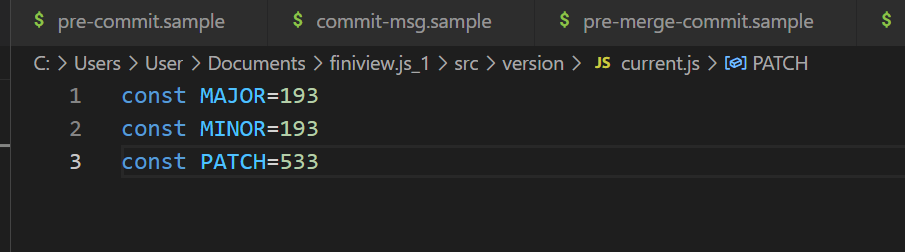
--- [./src/version/current.js] ---
const MAJOR=173
const MINOR=173
const PATCH=333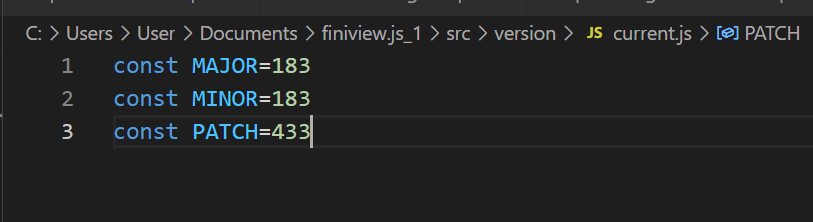
#!/bin/sh
#echo "commit githooks"
#특정 문자열 입력시만 작동하는 분기 로직

path="./src/version/current.js"
tokens=('MAJOR' 'MINOR' 'PATCH' 'REVISION')

# ver-major / ver-minor / ver-patch / ver-hotfix


#cat .git/COMMITMESSAGE
#versionTok=`grep -oP '(?<=#)(\s)(.*$)' ".git/COMMITMESSAGE"`
versionTok=`grep -oP '[?<=#]\w+' .git/COMMITMESSAGE`
# echo "$versionTok"
# check=`grep 'major' ".git/COMMITMESSAGE"`
# if [ -z "$check" ]
# then
# echo "empty"
# else
# echo "not empty"
# fi

echo "$versionTok"
substr='#major'
if [[ "$versionTok" =~ "$substr" ]]
then
#echo "match"
else
#echo "not match"
fi

substr='#minor'
if [[ "$versionTok" =~ "$substr" ]]
then
#echo "match"
else
#echo "not match"
fi

substr='#patch'
if [[ "$versionTok" =~ "$substr" ]]
then
#echo "match"
else
#echo "not match"
fi


#value=`cat $path`
#echo "$value"
#file=$(<./src/version/current.js)
#echo "$file"
# add changes to commit state
git add ./src/version/current.js

exit 1
리눅스 bash 스크립트 기능 찾을 때 참고한 사이트들
연산자 사용법
https://www.geeksforgeeks.org/bash-script-arithmetic-operators/
배열 사용법
https://shlee1990.tistory.com/918
문자열 치환 (sed)
https://askubuntu.com/questions/76808/how-do-i-use-variables-in-a-sed-command
특정 파일의 특정 문자열 치환 (grep | sed)
https://unix.stackexchange.com/questions/472476/grep-global-find-replace
https://www.hahwul.com/2019/02/10/multi-file-replace-string-with-grep-sed/
쉘 기본 사용 법
https://engineer-mole.tistory.com/200
깃 훅 예제
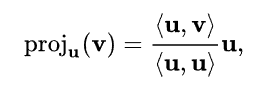
임의의 벡터 세트가 서로 직교 하도록 하는 계산 법
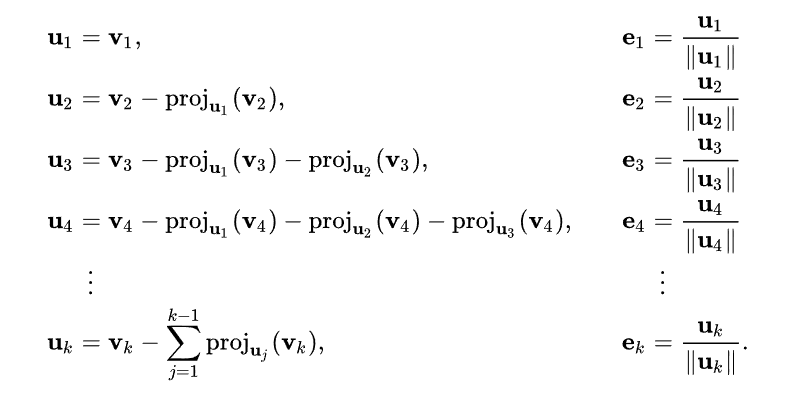
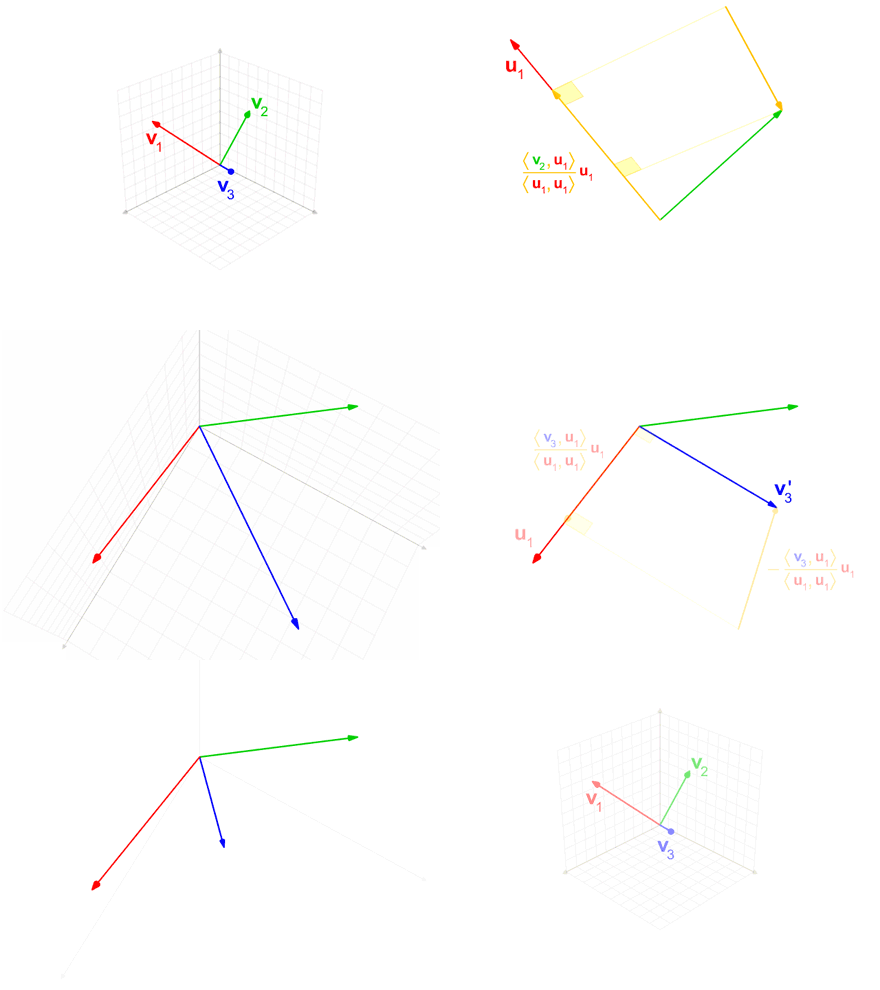
버저닝 정책
DirectX 렌더링 프로그램을 만들다 보면 main() 함수에 다음과 같은 코드를 볼 수 있다.
main()
{
   ...
   while(1)
   {
      if(PeekMessage(&msg, 0, 0, 0, PM_REMOVE))
      {
         if(msg.message == WM_QUIT)
            break;
         TranslateMessage(&msg);
         DispatchMessage(&msg);
      }
      else
      {
         renderer.Update();
         renderer.Render();
      }
   }
   ...
}
다음과 같은 코드를 메세지 펌프 라고 부른다.
다른 메세지를 처리하는 중에 큐에서 메세지를 꺼내 처리하는 코드
이 단어는 Z emotion에 다닐 때 들은 것인데 오늘 문득 저게 떠올랐다, 갑자기?, 하지만 ‘메세지 펌프’ 라는 용어가 기억이 안나 한참을 검색하여 발견한 내용을 기억하기 위해 포스트로 적게 되었다.
윈도우에서 이벤트 메세지를 가져오는 함수는 두가지가 있다
GetMessage(…) 와 PeekMessage(…) 두 함수는 메세지 큐가 비어있을 때 리턴 여부에 있다.
GetMessage(…) 의 활용은 다음과 같다.
while(bRet = (GetMessage(&msg, hWnd, 0, 0) != 0)) // <<여기서 대기
{
   if (bRet == -1)
   {
      // handle the error and possibly exit
   }
   else
   {
      TranslateMessage(&msg);
      DispatchMessage(&msg);
   }
}
출처 : https://abipictures.tistory.com/26
서브모듈 추가
$git submodule add [url] [name]*가끔 add_clone not function 이라는 에러 메세지가 나올때가 있는데 깃 버전이 낮아 발생하는 에러이니 버전 업데이트를 해보기 바란다.
서브모듈의 url 변경
.gitsubmodule 파일의 url 항목을 변경하고 다음 명령을 실행한다
git submodule sync --recursive <submodule_dir>리포지토리 기록이 다를경우 새로 체크아웃 해야한다.
cd <submodule_dir>
git fetch
git checkout origin/master
git branch master -f
git checkout master
https://stackoverflow.com/questions/913701/how-to-change-the-remote-repository-for-a-git-submodule
.gitignore 파일에 새로운 항목을 추가했을때 untracked file 항목에 그대로 남아있을 때가 있다.
그럴때 git cache를 초기화 해주면 된다.
$git rm -r --cached .
$git add .
$git commit -m "fixed untracked files"
캐시 명령어 끝에 점(.) 을 꼭 붙여 주어야 한다.
출처 : https://doubly12f.tistory.com/148